TEMPO
TEMPO
 SUNCLAX
Obsidian Is Brilliant. I Use It as a Finder.
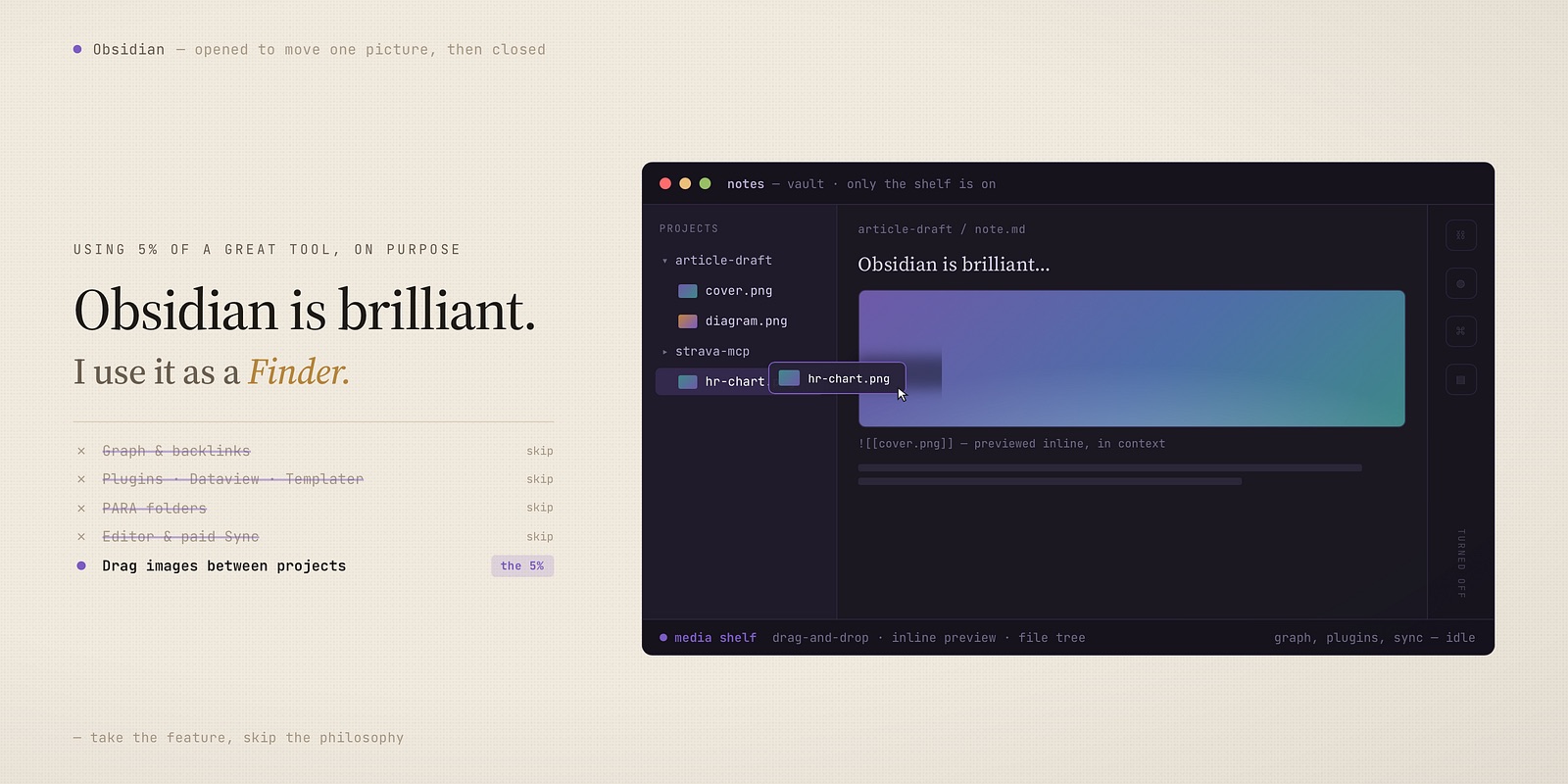
Obsidian is the most powerful note app most people will ever touch — backlinks, graph, plugins, PARA done beautifully. It’s installed on my Mac, and I use almost none of that. Not as my editor — that’s Emacs. Not for sync — I have my own. It does exactly one job: it moves media between my projects, like a Finder for the images my notes collect. Here’s why using 5% of a great tool is a real choice, not a failure.
I have Obsidian. I barely use Obsidian.
Every few months someone asks what I use for my “second brain,” and when I say plain text files in a folder, they say: you have to try Obsidian. So I did. Properly — vault, plugins, the whole ritual. And it’s still installed today.
But if you watched me use it, you’d be confused. I never open the graph. I have no community plugins doing clever things. I don’t run a single dataview query — and I don’t even write in it; every word I type lives in Emacs. I open Obsidian, drag a screenshot from one project into another, and close it. That’s the whole session. I am running one of the most capable pieces of software in its category as a glorified file browser for my images.
And I want to be clear, because the internet turns this into a war it doesn’t need to be: that’s not a knock on Obsidian. Obsidian is genuinely, unusually good. The reason I only use a sliver of it isn’t that the rest is bad — it’s that the rest solves problems I don’t have. Both things are true, and the gap between them is the whole point of this post.
What Obsidian is actually great at
Let me steelman it, because the praise is earned.
- Backlinks and the graph. If you think in connections — this idea relates to that one, this person shows up in three projects — Obsidian makes that web visible and navigable. You link as you write, and structure emerges on its own. For associative thinkers, that’s not a gimmick; it’s how their head already works, finally on screen.
- Plugins. Dataview, Templater, Tasks, Kanban — the community has built an entire operating system on top of Markdown. You can shape Obsidian into a CRM, a habit tracker, a research database. Nothing else in plain-text land comes close to that ecosystem.
- It never locks your files away. This is the part I respect most. Your notes are Markdown on disk. No proprietary blob, no export dance. A note app designed to let you leave is one that deserves trust — and it’s exactly why I could adopt it without adopting all of it.
And then there’s the thing it’s quietly perfect for.
Where Obsidian really shines: PARA
If you run PARA — Tiago Forte’s Projects, Areas, Resources, Archives — Obsidian might be the best home for it ever made.
PARA is a filing system organized by actionability, not topic. Projects you’re actively pushing, Areas you maintain, Resources you might want later, Archives you’re done with. The method lives or dies on one motion: moving a note from one bucket to the next as its role changes. A project finishes, it drops to Archives. A resource becomes relevant, it climbs into a project.
Obsidian makes that motion frictionless. Quick-switcher to jump anywhere, drag between folders, and — crucially — the graph and backlinks mean a filed note doesn’t go dark. It still glows with every connection to your active work. For a knowledge worker drowning in clippings, meeting notes, and half-formed ideas, PARA-in-Obsidian is a genuinely great system. If that’s you, go all in. You’ll love every feature I just said I ignore.
It’s just not how my notes work.
My actual second brain isn’t Obsidian
Here’s the part that matters. My notes are plain text — Org and Markdown — in one folder that syncs across my machines, with a naming convention: a timestamp, a title, a few keywords. 20260624T162047--obsidian-is-brilliant__article_draft.org tells me when, what, and what kind before I’ve opened anything.
I don’t file them and I don’t link them. I search them. ripgrep across the whole folder returns any note in well under a second; from Emacs it’s one keystroke. Capture is a new file. Retrieval is a search. I never decide whether something is a Project or a Resource, because I never find things by walking a tree — I find them by remembering three words that are inside them.
So the engine of my system — capture, naming, search, sync — has nothing to do with Obsidian. All the power Obsidian offers sits exactly where my workflow has no socket to plug it into. Which raises the obvious question.
So why is it still installed?
Because of one job my text-first setup is genuinely bad at: moving media between projects.
The text, I have covered. I write in Emacs, search with ripgrep, and sync the whole folder myself — so Obsidian’s editor, its search, and its paid Sync are three things I actively don’t use. What plain text and a terminal handle poorly is the binary stuff: screenshots, diagrams, image attachments. Seeing them as thumbnails, previewing them inline, dragging one out of this project and into that one — that’s clumsy in a text editor and invisible in a terminal.
Obsidian does exactly that, beautifully. It previews images inline, shows me attachments in the context of the notes that use them, and lets me drag a file from one project into another and fix the link in a single motion. Finder can move the file too — but it can’t show me which note uses it. Obsidian can.
So that’s the entire job Obsidian does on my system: it’s the visual layer for the media my projects accumulate — a Finder that understands my notes well enough to move pictures between them. I’m using maybe 5% of the app — inline media, drag-and-drop, the file tree — and ignoring the 95% everyone installs it for. Not the editor. Not the sync. Not the graph. Just the pictures.
Using 5% of a great tool is allowed
Here’s the part I had to make peace with, and the reason I’m writing this down: you do not have to use all of a tool for it to earn its place.
There’s a quiet guilt in productivity culture that says if you install Obsidian you should be running PARA, tending a graph, building dashboards — and if you’re not, you’re “doing it wrong” or wasting the app. That’s backwards. A powerful tool used narrowly isn’t waste. It’s a tool doing the one thing it does better than the native option, while you decline the philosophy bolted on around it.
Obsidian’s one thing, for me, is being a better window onto plain text than the OS ships with. I take that and leave the rest, without resentment on either side. I’m not fighting the app to be smaller; I’m just only opening the door I need.
The real lesson: take the feature, skip the philosophy
It would be easy — and wrong — to turn this into “Obsidian is overrated.” It isn’t. The mistake is adopting a powerful tool’s entire worldview because you liked one of its features.
Two honest questions sort out how far in you should go:
- Do you file, or do you search? If you find things by navigating a structure you maintain, Obsidian’s organization is a gift — use all of it. If you find things by typing what you remember, you may only need its reading window, like me.
- Do you think in links, or in documents? If your ideas live in a web of connections, the graph is your brain made visible. If your ideas live in self-contained notes, it’s a screensaver — and that’s fine.
I search, I think in documents, and I write in Emacs — so the most powerful note app on earth is, on my Mac, the place I drag pictures between projects. And that’s the right call for my system. Use every inch of Obsidian if you run PARA and link as you think. Use a sliver of it, like I do, if your text already lives somewhere else and you just need a visual shelf for the media. Both are legitimate. The only wrong move is letting the app decide how much of your brain it gets.
Thanks for reading. Follow on X: https://x.com/maxclaxOS
Dotfiles: https://github.com/maxclax/dotfiles
Related: