TEMPO
TEMPO
 SUNCLAX
Before You Spend a Fortune on a Laptop for Local AI, See What 24GB Can Do — 16 Works Too.
The advice is always “buy more machine”
Every thread about running AI locally ends the same way: buy more machine. 64 gigs minimum, 128 if you’re serious, and a GPU that costs more than the laptop it’s bolted to. I believed it. For a long time I ran local models on a 24GB laptop the way everyone tells you to — through Ollama — and I spent that time dancing with it. Slow generation, models that swapped and stalled, the fan telling me I’d overreached. The obvious conclusion was the one the threads kept selling: my machine was too small. Save up. Buy the big one.
That conclusion was wrong, and I want to be precise about why, because it cost me longer than it should have. The bottleneck was never the 24GB. It was that the tool I was using is built to hide the exact settings that a 24GB machine lives or dies by. I didn’t need more silicon. I needed to take the wheel.
Ollama was the right tool for years — until my memory got tight
I’m not here to dunk on Ollama. It’s genuinely excellent, and for most people it’s the correct choice. You run one command and a model is answering you. It picks the context length, the cache format, how much to put on the GPU, how many models to keep warm — all of it — and it picks sane defaults so you never have to learn what any of those words mean. That is a real gift.
But every one of those defaults quietly assumes you have headroom. And that assumption is the whole product. When you’ve got a machine with RAM and GPU to spare, Ollama guessing on your behalf is a feature — it’s right often enough that you never notice it’s guessing. Buy the big machine and Ollama is the right answer; I mean that.
On 24GB the math flips. The defaults that felt invisible on a big machine become the thing crushing you on a small one, and Ollama’s whole value — deciding for you, keeping the controls out of sight — turns into the wall you keep hitting. The knobs you were never meant to touch are suddenly the only thing that matters, and they’re behind glass.
So I changed how I run things. Not because Ollama got worse — because my constraints got specific, and specific constraints need a tool you can actually configure. Which meant going one layer down, to the engine itself.
llama.cpp isn’t a rival to Ollama — it’s the engine inside it
This is the part most “Ollama vs llama.cpp” posts get wrong, so let me be exact: they aren’t two competitors you pick between. They’re two layers of one stack.
llama.cpp is the engine — the hard, genuinely remarkable piece of open-source work that runs the model on your hardware: the math, the Metal kernels, the quantization, the memory layout. It’s the contribution everything else is built on.
Ollama is a friendly layer on top of that engine. It bundles llama.cpp, adds model downloading and sane defaults, and gives you a one-line front door so you never have to see the engine at all. That packaging is real, valuable work — it’s why so many people run local models who otherwise never would.
So “moving from Ollama to llama.cpp” isn’t switching sides. It’s opening the hood on a car you were already driving. The engine was always doing the work — I just stopped letting the wrapper make my decisions and started making them myself, because on 24GB the decisions are the whole game.
The five knobs that were behind the glass
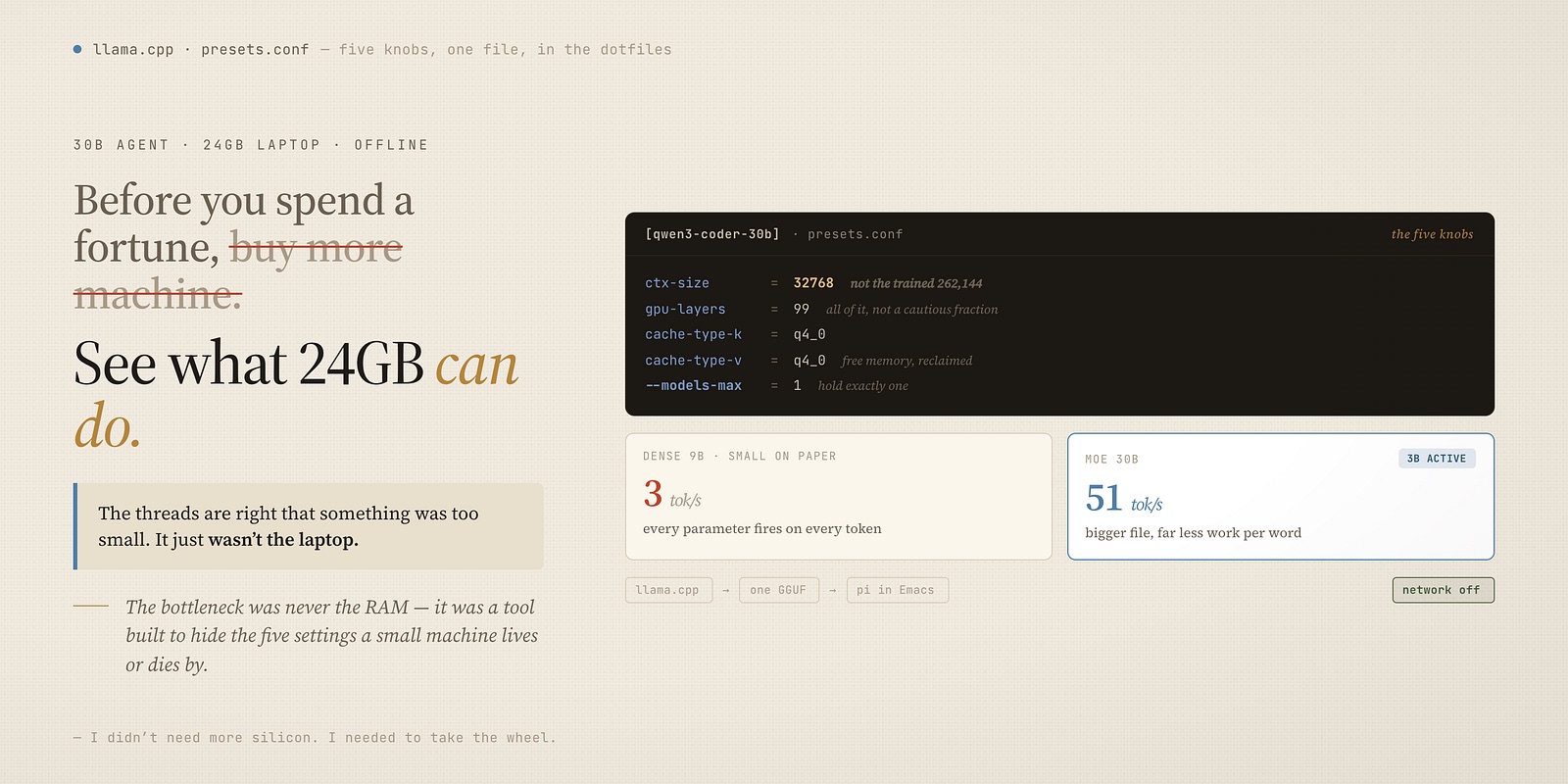
Here is the entire difference, and none of it is exotic. On a tight memory budget, five settings decide whether a model flies or crawls — and on my setup they live in one small file, checked into my dotfiles, one section per model:
[qwen3-coder-30b]
model     = …/gguf/qwen3-coder-30b-A3B-UD-Q3_K_XL.gguf
ctx-size  = 32768
gpu-layers = 99
cache-type-k = q4_0
cache-type-v = q4_0
That’s it. That’s the whole thing Ollama was doing for me and getting wrong. Line by line:
- ctx-size. Left alone, the engine loads a model at its full trained context — 262,144 tokens for these — and the memory to hold that conversation history won’t fit in 24GB, so you either can’t load it or you crawl. Pinning it to 32k is the single biggest lever, and it’s the one a wrapper can’t set for you because only you know how long your conversations actually get.
- cache-type-k / cache-type-v. Store that conversation history in a compressed form (
q4_0) instead of full precision. On a small machine this is free memory you’d otherwise have no way to reclaim. - gpu-layers = 99. Put every layer of the model on the Mac’s GPU. All of it, not a wrapper’s cautious fraction.
- the model itself. This is the one that shocked me. A dense 9B model — small on paper — managed 3 tokens a second on my machine. The Qwen3-Coder-30B and Qwen3.6–35b here, three times bigger, runs at nearly 51. Because it’s a Mixture-of-Experts model: only about 3B of its 30B or 35b parameters fire on any given token. Bigger file, far less work per word. Choosing MoE over dense is worth more than any other single decision, and it’s a choice, not a default.
- one more, in the launcher:
--models-max 1. The router will happily hold four models in memory at once out of the box. One 30B or 30B at this quantization already sits around 19 GiB wired — four of anything and you’re dead. I tell it: hold exactly one.
Every one of those is a setting Ollama makes for you, in a direction tuned for machines bigger than mine. That’s not a bug in Ollama. It’s the deal you signed when you chose the tool that decides for you. The moment your memory is the binding constraint, you have to be the one deciding.
The whole stack is three things
Strip away the config and this is a small pile:
- llama.cpp — the inference engine. Installed straight from Homebrew, declared in my Nix config next to everything else on the machine:
"llama.cpp" # Local LLM inference — GGUF models on Metal
- A model — a single GGUF weights file per model, living in a local cache outside the dotfiles because it’s multiple gigabytes and machine-specific. The config points at it; it isn’t checked in.
- pi — the coding agent that sits on top and actually does work: reads files, edits them, runs commands, keeps a session. Installed once from npm by a setup script:
npm install -g --ignore-scripts @earendil-works/pi-coding-agent
Engine, weights, agent. Nothing here is a paid tier and nothing phones home. The weights download once; after that the whole thing runs with the network off.
Driving it: a handful of Make verbs
I didn’t want to remember llama.cpp’s flags, so the router and its controls are wrapped in the same Makefile that runs the rest of my machine. The engine reads its port, model cache, and presets from exported environment variables, so starting it is one word:
make llama_serve      # start the router (loads one model, on demand)
make llama_models     # list models and which one is loaded
make llama_load model=qwen3.6-35b     # swap the active model
make llama_unload     # free the RAM
make llama_stop       # stop the router
The router speaks the standard OpenAI API on a fixed local port, which is the detail that makes the last piece click.
pi: a real coding agent, pointed at localhost
Because the router exposes an ordinary OpenAI-compatible endpoint, anything that speaks that protocol can use my local model as its brain — including pi. I point pi at the local router instead of a cloud provider, and now I have a coding agent that edits my files and runs my commands with nothing leaving the laptop.
Two things make it feel like a tool and not a toy. First, it runs inside Emacs, so the agent lives in the same window as the code it’s editing. Second, it reads a global instructions file — my dotfiles carry an AGENTS.md that tells any agent, local or cloud, the house rules: don’t commit unless asked, short comments only, standard Emacs keybindings, no watermarks. The same file governs the cloud agents and this local one, so the local model behaves like the rest of my tooling rather than a bolted-on experiment.
It’s all in the dotfiles, so a fresh machine is one command
None of the above is hand-set on the laptop. The engine is declared in Nix, pi is installed by a setup script, and the configuration — the presets file with those five knobs, the environment exports, the Make verbs — is chezmoi-managed like everything else I own. On a new machine one apply installs llama.cpp, installs pi, writes the presets, and registers the commands. The only thing I fetch by hand afterward is the weights, because those are the one genuinely large, machine-local piece.
Which means the “expensive setup” everyone warned me about is, on disk, a config file and a package list. The cost moved off the hardware and into version control.
Who should skip this
Be honest about which machine you have.
Plenty of RAM and a real GPU? Stay on Ollama. Genuinely. Everything I just described is manual labour you don’t need — Ollama’s defaults are tuned for exactly your situation, and it will make good choices you’d otherwise be making by hand for no reason. Buying the big machine and running the simple tool is a completely valid answer.
Sixteen or twenty-four gigs, and you’ve been told that isn’t enough? It’s enough. It was always enough. What wasn’t enough was a tool that hid the five settings your machine depends on. Take the wheel: pin the context, quantize the cache, put it all on the GPU, pick a MoE model, hold one at a time. On my 24GB laptop that runs a 30B coding and 35B agent at fifty tokens a second, offline. On 16GB you simply size down — a smaller model, or the same one at a tighter quantization — and the identical five knobs still carry you from a stalling mess to something you’ll genuinely enjoy using. Either way the difference is a config file, not a credit-card-sized dent in a bigger machine.
Before you save up for the expensive one, spend an evening on the laptop you already own. Point the engine at it, turn the five knobs, and see what’s been sitting inside the whole time.
The threads are right that something was too small. It just wasn’t the laptop.
Thanks for reading. Follow on X: https://x.com/maxclaxOS
Dotfiles: https://github.com/maxclax/dotfiles
Related: