TEMPO
TEMPO
 SUNCLAX
I Run Seven Claude Code Agents at Once. TMUX Was the Thing That Broke. HERDR
The stupidest job I’ve ever had
For a while my actual work, the thing my hands were doing most of the day, was pressing C-x n to cycle through panes to see which agent had stopped.
That’s it. That was the job. Seven agents running in seven directories — dotfiles, the blog, two websites, the planner project, a git-history cleanup — and every couple of minutes I’d walk the panes like a night watchman checking doors. Working. Working. Waiting on me for eleven minutes. Done four minutes ago. Working.
The eleven minutes is the part that hurt. An agent that’s blocked on a question isn’t slow, it’s stopped, and it will stay stopped forever, politely, until I happen to look at it. Multiply by seven and the arithmetic gets grim: the more agents I ran, the longer each one sat dead, because my attention was the thing being divided.
I’d built a beautiful little factory where every machine had to raise its hand and wait to be noticed by one distracted human.
This is a new problem, and tmux is not being blamed
I’ve used tmux for years and I’d still defend every design decision in it. But it was built for processes, and processes have exactly two states worth knowing: alive and dead. If a process needs something it prints to stdout, and you’ll read it when you get there. That model has been correct since the seventies.
Agents broke it by inventing a third state.
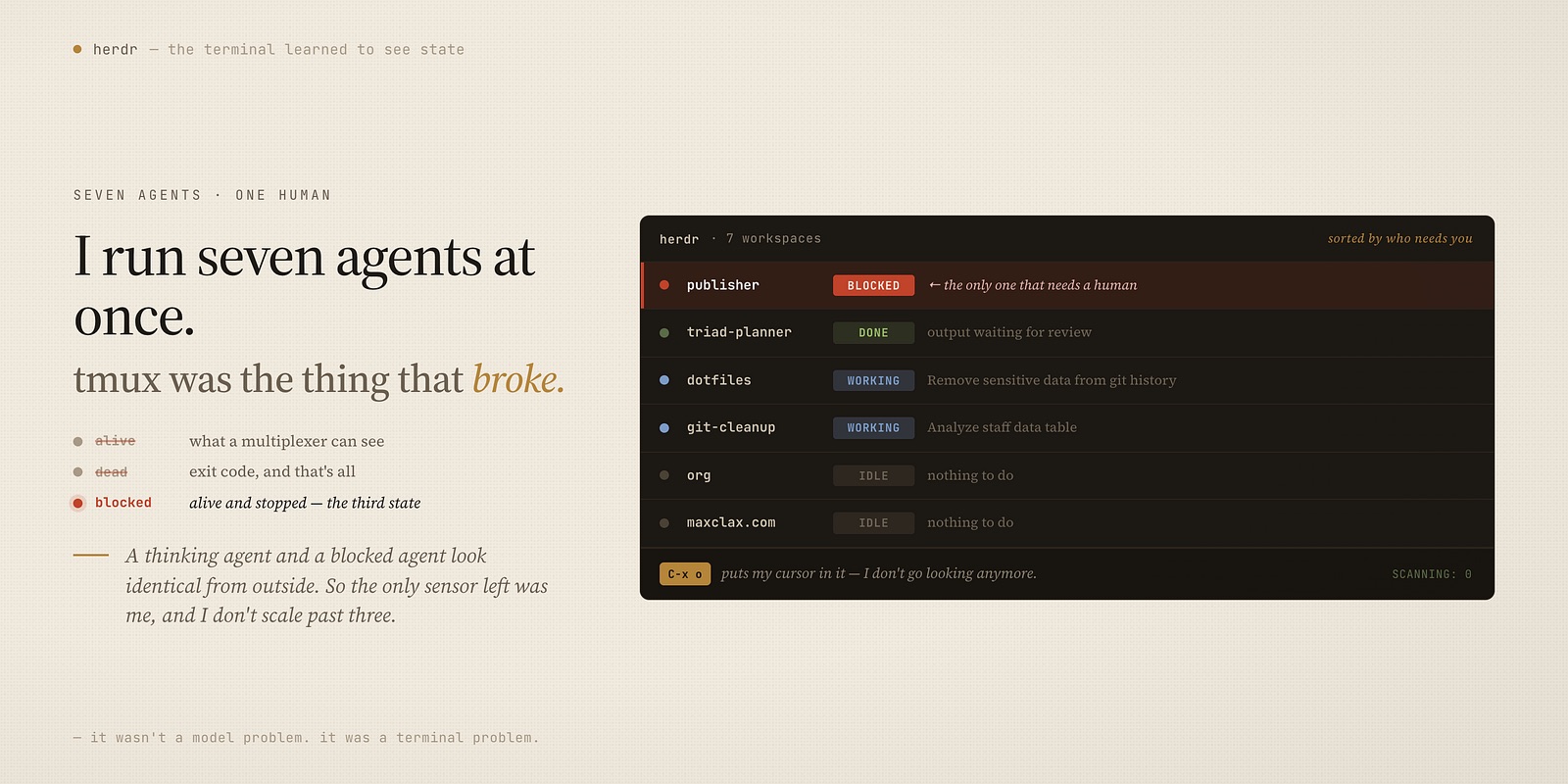
An agent can be alive and stuck — running, holding the terminal, consuming nothing, waiting for a human to say “yes, use that approach.” No exit code. No output stream to tail. Nothing a multiplexer built on processes can see, because from the outside a thinking agent and a blocked agent look identical: a live process with a cursor in it.
So the terminal can’t tell you, which means the only sensor left is you. And you don’t scale past about three. Ask anyone who’s tried to run five.
What changed when the terminal learned to see state
I switched to herdr, which describes itself as a terminal workspace manager for AI coding agents, and after a week I’d stop describing it that way. It’s a multiplexer that knows what your agents are doing.
Concretely: it ships integrations that hook into the agents themselves — Claude Code, Codex, Copilot, opencode and a handful of others — and those hooks report a real state back to the terminal. Not a guess from scraping output. The agent says what it’s doing.
Four states, and they’re the right four:
- working — thinking, editing, running something. Leave it.
- blocked — it asked you a question and has stopped. Go now.
- done — finished, output waiting for review.
- idle — sitting there with nothing to do.
That distinction between working and blocked is the whole ballgame, and it’s the one thing tmux structurally cannot give you. Once the terminal knows the difference, everything about how you work changes, because you stop polling.
Here’s my sidebar as I write this — seven workspaces, one column, live:
dotfiles       working
org            idle
publisher      blocked    ← the only one that needs a human
maxclax.com    idle
triad-planner  done
I don’t go looking anymore. The one that needs me announces itself, and C-x o puts my cursor in it. Seven agents, and the amount of scanning I do is zero.
Sorting by urgency, not by position
The small design decision I’ve come to appreciate most: the agent list is sorted by how much it needs you, not by the order you happened to open things.
Blocked rises to the top. Done sits under it. Working and idle fall to the bottom, because neither one wants anything from you.
Which means the answer to “what should I look at next” is permanently the first row. Not a judgement, not a scan — position one. I bound C-x a to walk down that queue, and going through it in order is going through your work in priority order, for free.
Each row also shows what the agent is actually doing, because Claude Code publishes its current task as the terminal title. So the sidebar doesn’t say claude ×7. It says Remove sensitive data from git history and rewrite commits, and Analyze staff data table. Seven identical processes became seven distinguishable jobs, which is the difference between a dashboard and a list of PIDs.
Parallel agents need parallel checkouts
The other thing that breaks the moment you go past one agent has nothing to do with attention. Two agents in the same repository will fight — over the working tree, over the branch, over a file one is mid-edit on.
herdr has git worktrees built in: herdr worktree create --branch <name> makes the checkout, opens it as its own workspace, and that agent lives there. Its own directory, its own branch, no negotiation. Removing it later is one command.
This is the unglamorous half of running agents in parallel and it’s the half people discover at 2am after two agents have clobbered each other’s work. Isolation isn’t a feature you appreciate — it’s a category of disaster you stop having.
Then it turned out to be scriptable
I expected a nicer terminal. What I did not expect was that the whole thing exposes a socket API, and that this quietly changes what you can automate.
Every state the sidebar shows is queryable, and — the part that matters — waitable:
# block a script until this agent actually needs a human
herdr agent wait publisher --until blocked --timeout 600000
# hand an agent a prompt and wait for it to finish
herdr agent prompt dotfiles "run the test suite and fix what fails" --wait --until done
Sit with wait --until blocked for a second. That’s a shell primitive for “pause until the AI needs a human,” which is the exact synchronization point every agent workflow needs and none of them had. You can now write a script that kicks off five agents, sleeps, and wakes up precisely when one of them wants something.
The terminal stopped being a place I watch agents and became something I can build on top of. I didn’t have that a year ago and nothing else in my stack offered it.
Config as code, because everything else here is
This is a dotfiles blog, so: it’s a single ~/.config/herdr/config.toml, which is checked in and templated like everything else on my machine.
I spent an evening making it match my tmux muscle memory — C-x prefix, Emacs pane bindings, C-x 2 and C-x 3 to split, C-x f/b/n/p to move — and after that the switch cost me nothing. Twenty years of finger habits, preserved in a file I can apply to a fresh laptop in one run.
[keys]
prefix = "ctrl+x"
split_horizontal = "prefix+2"
split_vertical    = "prefix+3"
next_agent        = "prefix+a"
focus_agent       = "prefix+alt+1..9"
If you’re coming from tmux, budget an evening for the keymap and then stop thinking about it. That’s the entire migration.
Who this is actually for
Be honest with yourself about which one you are.
One agent at a time? You don’t need this. Genuinely — one agent in one terminal is a solved problem, and adding a workspace manager to it is ceremony. Bookmark this for later.
Three or more, in different repos? You are already doing the pane-cycling thing, whether or not you’ve noticed it. The gain isn’t speed, it’s that the idle time between “the agent stopped” and “you noticed” goes to roughly zero, and that gap is where all your throughput was disappearing.
Building anything that orchestrates agents? Go read the API docs before you write another polling loop.
The thing I’d want someone to have told me earlier: the constraint stopped being the model a while ago. Mine are fast, and they’re good, and for months the actual bottleneck in my day was a human walking a row of panes to find out who needed him. That’s not a model problem or a prompt problem. It’s a terminal problem, and it turned out to be fixable.
Thanks for reading. Follow on X: https://x.com/maxclaxOS
Dotfiles: https://github.com/maxclax/dotfiles
Related: