TEMPO
TEMPO
 SUNCLAX
I Wiped My MacBook on Purpose. One Command Brought It All Back.
Most dotfiles repos are a pile of symlinks and a hopeful install.sh. Mine rebuilds a whole MacBook — apps, system settings, secrets, and all — from one command. Here’s how the pieces fit.
The test that actually matters
Here’s the only benchmark I trust for a dotfiles setup: wipe the machine, run one command, walk away, come back to your Mac. Not “a Mac with your shell aliases.” Your Mac — the Dock on the left isn’t there because you dragged it, the hot corners do what you expect, firefox and ghostty and the App Store apps are installed, git is signed with the right key, and the secrets are decrypted and in place.
For years my dotfiles failed that test. They were a GNU Stow symlink farm plus a README full of “oh, and don’t forget to also…” steps. Every new machine was an archaeology dig. The fix wasn’t a better script — it was treating the machine as state I declare rather than steps I run.
Two tools do the heavy lifting, and they split the job cleanly:
- chezmoi owns the files — every dotfile, templated per-machine, with secrets encrypted.
- Nix ~~ Home Manager ~~ nix-darwin own the system — packages, the macOS defaults, Homebrew, even the App Store.
The trick is how they hand off to each other. Let me walk the layers.
Layer 1: chezmoi as the source of truth
chezmoi manages a source directory in git and renders it into your home directory. The thing that makes it more than stow is that every file can be a Go template, and the template variables describe the machine.
On a fresh box, chezmoi init asks a few questions and writes the answers into config. Mine prompts for the workspace paths, the Emacs flavour, the shell, and whether to wire up 1Password:
{{- $emacsType := promptChoiceOnce . "emacsType" "What type of Emacs are you on" (list "default" "Doom" "purcell") -}}
{{- $shell     := promptChoiceOnce . "shell" "Which shell do you want as default" (list "sh" "zsh" "fish") -}}
{{- $useOp     := promptBoolOnce . "useOp" "Use 1Password CLI (op) for configuration?" false -}}
But the prompts are the small part. The interesting part is that chezmoi already knows a lot about the machine — OS, architecture, hostname — and I derive a handful of boolean “machine classes” from that:
ephemeral   — a VM, a container, a box I'll throw away in an hour
headless    — no screen or keyboard
personal    — this machine is allowed to hold my real secrets
Those booleans gate everything downstream. A hostname starting with space- is personal. A box with conflicting nix-env packages pre-installed is flagged as an ephemeral container and gets a stripped-down config. The same repo produces a full personal workstation or a minimal throwaway shell, with no manual branching — the templates read the machine class and adapt.
That’s the whole philosophy in one idea: the repo is the same everywhere; the machine describes itself; the templates do the rest.
Layer 2: secrets without leaking them
A dotfiles repo is public-shaped even when it’s private — it’s the thing you most want to share and least want to leak. So secrets get two layers, and neither one ever lands in git as plaintext.
age encryption for files. chezmoi encrypts sensitive files with age, keyed to an identity that itself lives outside the repo:
encryption = "age"
[age]
    identity = "~/.ssh/dotfiles"
Adding a secret file is chezmoi add --encrypt <file>; it’s stored encrypted in the source tree and only decrypted on apply. A run_once_before_ script makes sure the age identity is present before anything tries to decrypt, so a fresh machine bootstraps in the right order.
1Password for values. Config values — git signing key, GitHub token, the restic backup repo URL — aren’t files, they’re strings I don’t want hardcoded. chezmoi can call the 1Password CLI at template-render time:
{{- $name       := onepasswordRead "op://Private/chezmoi-data/git-config-name" -}}
{{- $signingKey := onepasswordRead "op://Private/chezmoi-data/github-signing-key" -}}
{{- $resticRepo := onepasswordRead "op://Private/chezmoi-data/restic-repo" -}}
The secret never touches the repo — it’s pulled from the vault when the file is generated, on the machine, at apply time. And because it’s gated behind the useOp prompt, an ephemeral box that shouldn’t hold secrets simply never asks.
Layer 3: Nix owns the system
Files are solved. Now the actual system — and this is where most “dotfiles” stop short, because installing software and changing OS settings is exactly the part that resists being declarative. Nix makes it declarative anyway.
I use a flake with three inputs: nixpkgs, Home Manager, and (on macOS) nix-darwin. The flake’s system and the darwinConfigurations name are themselves templated from chezmoi’s machine facts, so the same flake.nix resolves to the right architecture and hostname on every box:
darwinConfigurations."{{ .hostname }}" = nix-darwin.lib.darwinSystem {
  inherit system;
  modules = [
    ./darwin-configuration.nix
    home-manager.darwinModules.home-manager
    # …overlays, home-manager wiring…
  ];
};
Home Manager handles the user-level packages and program configs (zsh, starship, direnv, atuin, syncthing — each its own small module). nix-darwin handles the things that need to touch the system.
The part people don’t expect: macOS settings as Nix
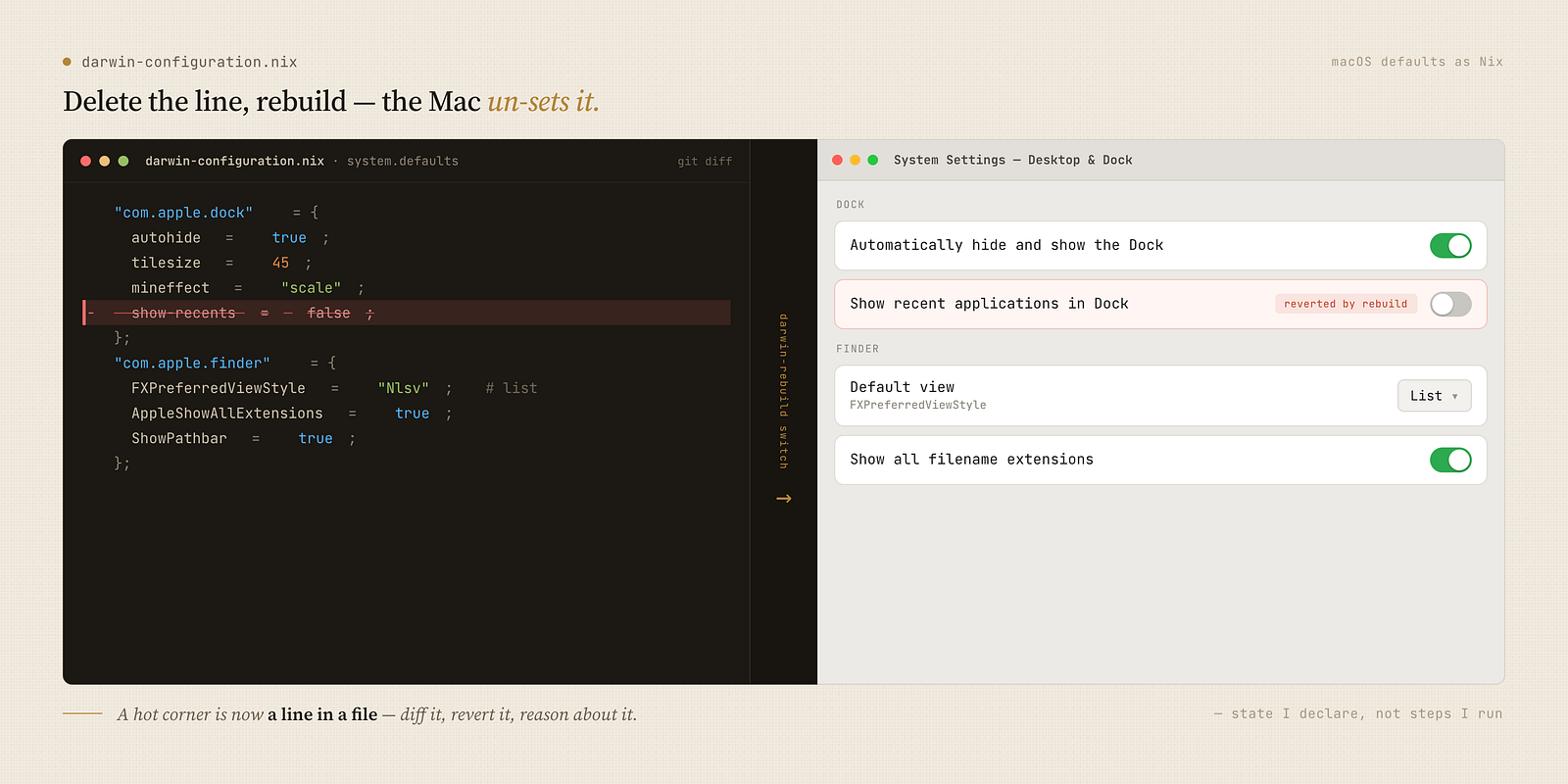
You can declare macOS defaults in Nix. The Dock, Finder, hot corners, screenshot behaviour — all of it, version-controlled:
system.defaults.CustomUserPreferences = {
  "com.apple.dock" = {
    autohide = true;
    tilesize = 45;
    mineffect = "scale";
    show-recents = false;
    "wvous-tl-corner" = 2;   # top-left → Mission Control
    "wvous-br-corner" = 10;  # bottom-right → Display Sleep
  };
  "com.apple.finder" = {
    FXPreferredViewStyle = "Nlsv";      # list view, always
    AppleShowAllExtensions = true;
    _FXShowPosixPathInTitle = true;
    ShowPathbar = true;
  };
  "com.apple.desktopservices" = {
    DSDontWriteNetworkStores = true;    # no .DS_Store on network/USB
    DSDontWriteUSBStores = true;
  };
};
The first time this clicked for me was genuinely strange: I deleted a setting from the file, rebuilt, and the Mac un-set it. Settings stopped being a thing I configured once and forgot — they became code I could diff, revert, and reason about. A hot corner is now a line in a file with a comment explaining what 10 means.
Homebrew, declared
Some Mac software just isn’t in nixpkgs, or wants to be a real .app. nix-darwin drives Homebrew declaratively for exactly that — and it’ll even prune anything not in the list (cleanup = "zap"), so the machine can’t drift:
homebrew = {
  enable = true;
  onActivation = { autoUpdate = true; upgrade = true; cleanup = "zap"; };
  brews = [ "dockutil" "mole" ];
  casks = [ "firefox" "ghostty" "obsidian" "little-snitch" "openmtp" ];
  masApps = { "Kindle" = 302584613; "Telegram" = 747648890; };
};
Yes — even Mac App Store apps, by their numeric ID. The whole installed-software surface of the machine is one list I can read top to bottom.
Activation: the last mile
Declarative state still needs a few imperative nudges to take effect. nix-darwin’s activation script is where I put them: create the ~/icloud symlink so my plain-text notes are reachable at a stable path, then restart the processes that cache preferences so changes show up without a logout:
killall Dock Finder SystemUIServer ControlCenter cfprefsd
That killall line is the difference between “the setting is technically applied” and “the setting is actually visible.” Small, but it’s the seam where declarative meets a stateful OS.
The daily workflow
Day to day, I almost never think about any of this. There’s a Makefile that wraps the two tools so the verbs are obvious:
make hm_diff      # build the new system, show a store-closure diff — no changes yet
make hm_update    # update the flake, diff, confirm, then switch
make hm_commit    # record the new flake.lock in the dotfiles repo
chezmoi apply     # render files (decrypt secrets, fill templates)
chezmoi diff      # preview file changes before applying
hm_update is the one I lean on. It updates the flake, builds the new generation, prints a nix store diff-closures so I can see exactly which packages change and by how much, and then asks for confirmation before switching. If I say no, it restores flake.lock and nothing happened. Updating my entire system is a reviewable diff with an undo button.
And when an update does go wrong — a package regresses, something breaks — Nix keeps every previous generation:
make hm_rollback # boot back into the last good generation
There’s no equivalent of “I changed seventeen settings by hand last month and can’t remember which one broke things.” The system has a history, and the history is navigable.
What I actually got out of it
It’s a real upfront cost — learning Nix is not a weekend, and the first working darwin-configuration.nix took me longer than I’d like to admit. The honest trade looks like this:
- You trade hours now for never re-deriving your setup again. New machine, wiped machine, second machine — same command, same Mac.
- You trade convenience for auditability. Every package, every macOS toggle, every secret reference is a line in a file with a comment. Nothing about my machine is a mystery I have to reverse-engineer from the GUI.
- You trade “it works” for “it’s reproducible.” Those aren’t the same thing, and the gap between them is every hour I used to spend setting up a new laptop.
If you already live in Nix, adding nix-darwin and folding chezmoi in front of it is a small step with a big payoff. If you don’t, start with the part that pays off fastest with the least Nix: let chezmoi template your dotfiles and encrypt your secrets first, then graduate the system layer to Nix when you’re ready.
The full setup — templates, the Nix flake, the macOS defaults, the Makefile — lives in my dotfiles. It’s the same repo behind my Org-mode setup; the plain-text notes that post talks about are reachable at that ~/icloud symlink the activation script creates. Take what’s useful.
Thanks for reading. Follow on X: https://x.com/maxclaxOS
Dotfiles: https://github.com/maxclax/dotfiles
Related: