TEMPO
TEMPO
 SUNCLAX
Skip the Budget App: A 10-Minute Monthly Money Report
It's the first of the month. Time for the monthly money report. Skip the budget app — you need ten minutes and one plain page.
The report you keep postponing
It's the first of the month again. Somewhere in the back of your head there's a small, nagging task: look at the money. What came in, what went out, what's left, and whether last month went the way you meant it to.
Most of us postpone it. Not because it's hard, but because the tools make it heavy. Open the budget app, sync the accounts, recategorize a dozen transactions, fix a spreadsheet formula that broke three months ago. By the time the tools are ready, the ten minutes you had are gone, and the report waits for "next weekend".
Skip the budget app for the monthly check-in
Budget apps are built for a bigger job: bank imports, years of categorized history, long-term charts. If you need that, they make sense. Most people don't need it for the monthly check-in — the moment you sit down and think about your money.
That check-in is the same every month:
- write down what came in
- write down what went out
- remember the subscriptions you forgot about
- see what's left
- decide what to do differently next month
That's not a database job. That's one plain page and ten minutes.
One page, five steps, ten minutes
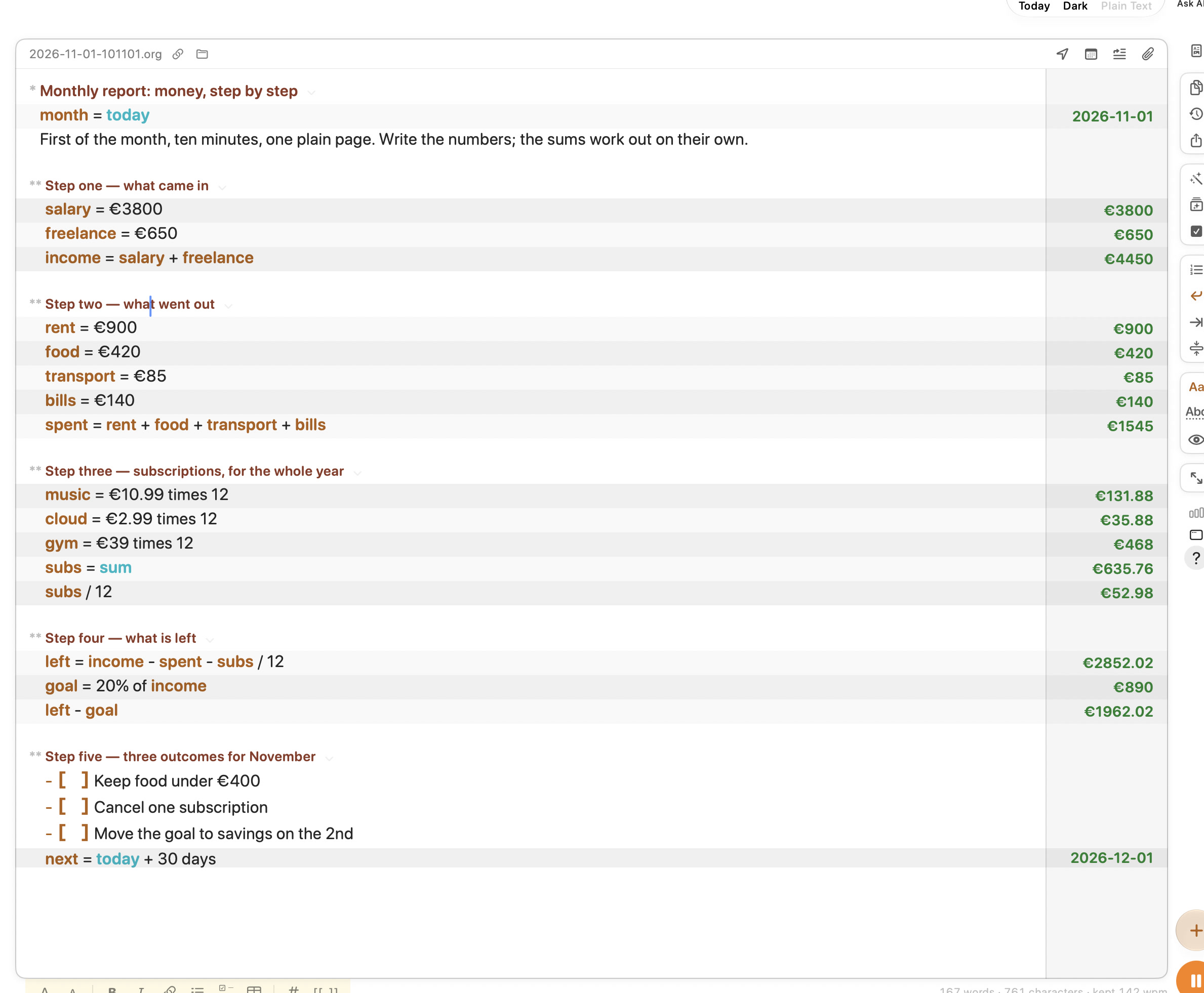
Here is the whole report, no budget app involved. The numbers below are example numbers, not mine and not a recommendation — swap in your own.
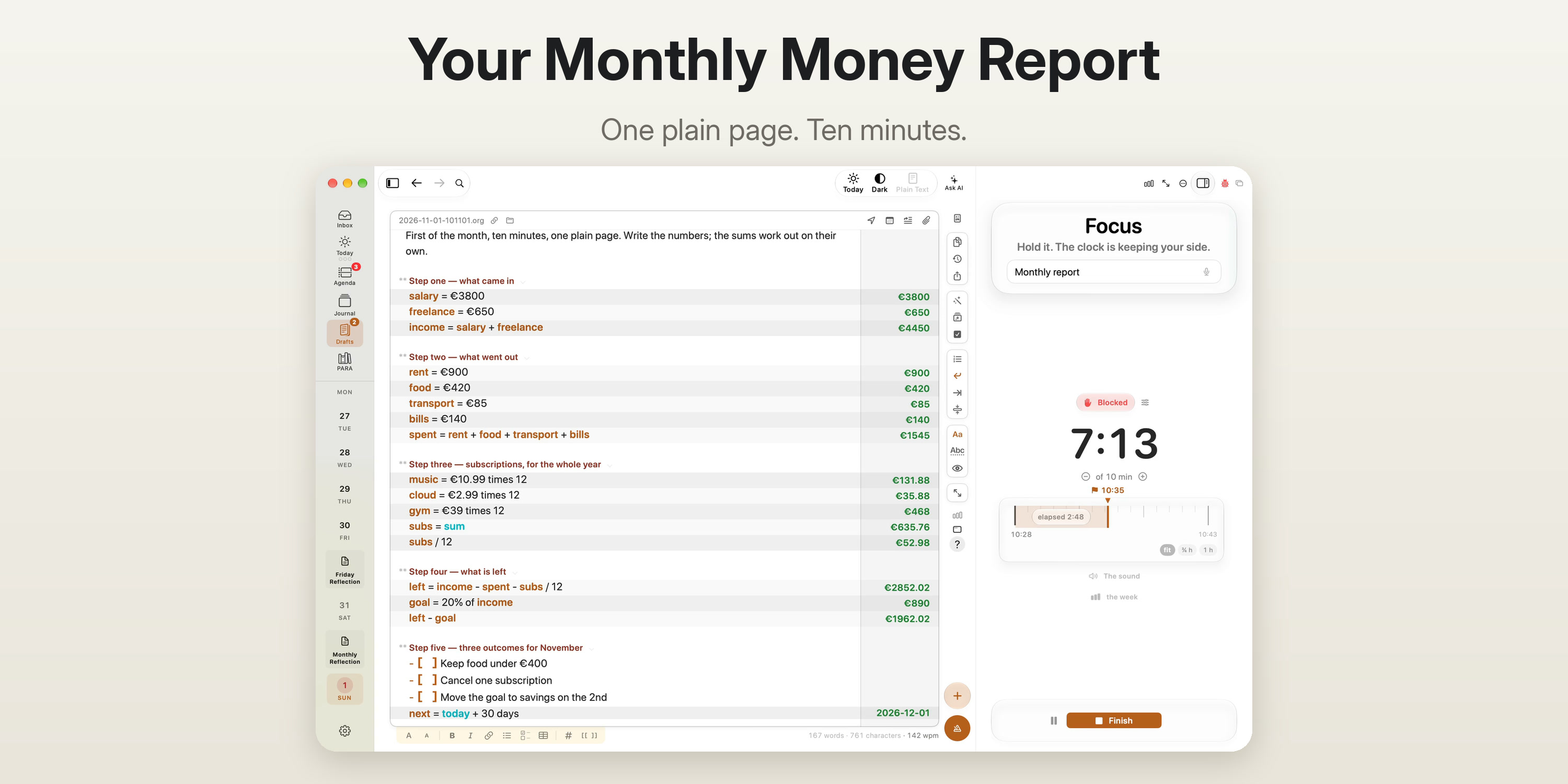
Step one: what came in
- salary = €3800
- freelance = €650
- income = salary + freelance → €4450
You name a number once, and from then on the name is the number.
Step two: what went out
- rent €900
- food €420
- transport €85
- bills €140
- spent = sum → €1545
No formula ranges, no cell references. Just a list and the word sum.
Step three: subscriptions, for the whole year
This is where monthly reports usually lie to us. €10.99 feels like nothing. So look at the year instead:
- music = €10.99 × 12 → €131.88
- cloud = €2.99 × 12 → €35.88
- gym = €39 × 12 → €468
- subs = sum → €635.76
- subs / 12 → €52.98 a month
Seeing €635.76 written down is a different feeling from seeing three small charges on a statement.
Step four: what is left
- left = income − spent − subs / 12 → €2852.02
- goal = 20% of income → €890
- left − goal → €1962.02
That last line is the honest one: what's left after you've paid your future self.
Step five: three outcomes for November
Numbers alone don't change anything. Decisions do. So the report ends with exactly three outcomes for the coming month. Outcomes, not goals: in the Rule of Three, an outcome names what changes in your life, so each one reads Keep …, so next month I can …:
- [ ] Keep food under €400, so next month I can eat out with friends without guilt
- [ ] Keep only the subscriptions I use, so next month I can move that money into savings
- [ ] Keep the goal in savings from the 2nd, so next month I can start with a cushion, not a gap
And one more line: next = today + 30 days → 2026-12-01. The date of the next report, written by the page itself.
Three, not ten. Three you can actually remember on the 15th.
Same page, on your phone
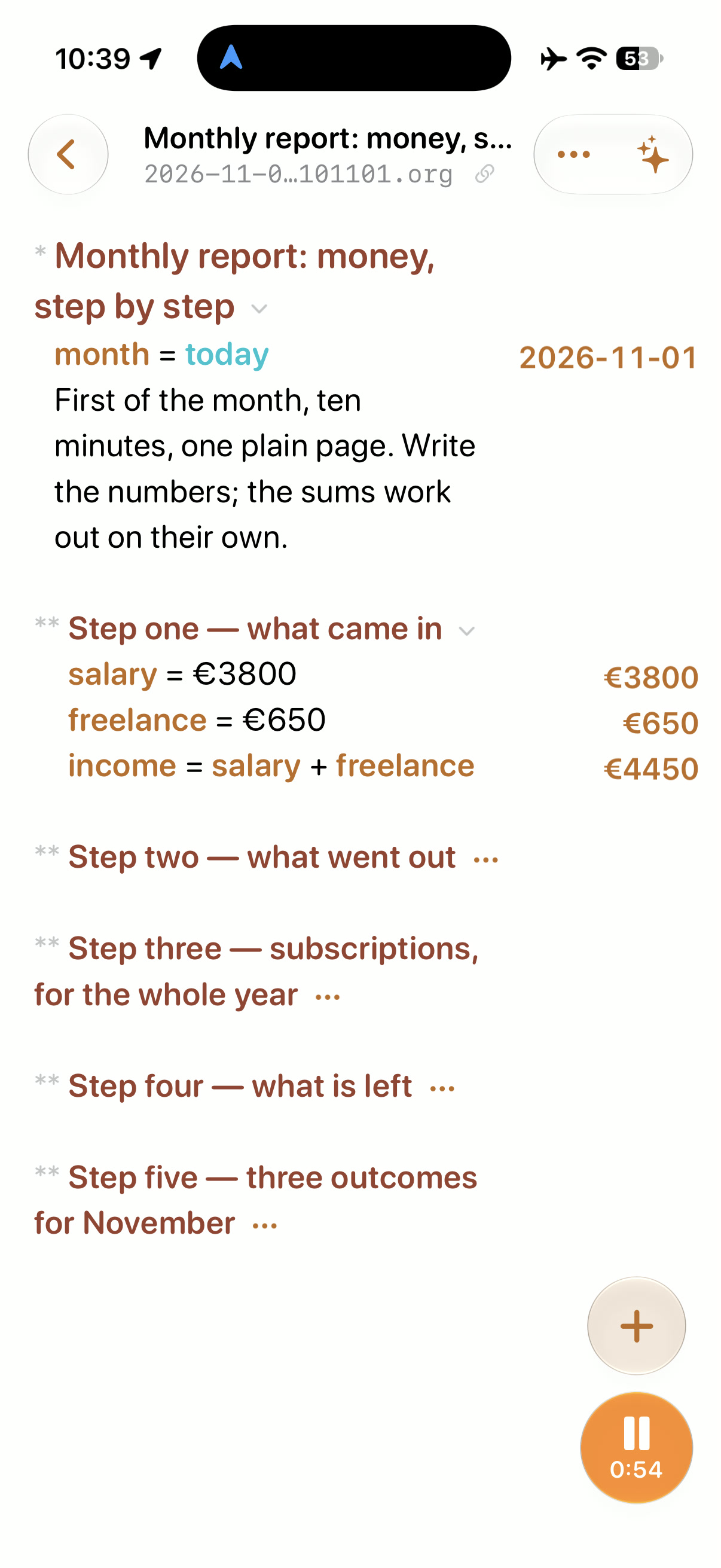
The report doesn't have to wait until you're at your desk. The same plain file opens on iPhone, and the results column is still there: €3800, €650, €4450.
Fold the steps you've finished, so you only see the one you're working on. And a timer runs alongside the page, so the ten minutes stay ten minutes.
Watch it being written
The recording shows the whole page being typed in 55 seconds, with the timer running. No account sync, no setup, no add-ons. You type a line, the result appears in the column on the right.
Where this page lives: Tempo
I write this report in Tempo, the outcomes app I build. Tempo is built around one idea — the Rule of Three: a day, a week or a month gets three outcomes, not an endless list. Step five of this report is exactly that.
What you saw in the note above is all Tempo itself:
- variables like
incomeandsubs sum,times, and%right inside the text- dates like
today + 30 days - checkboxes for the three outcomes
It's just plain text. The file is a normal Org or Markdown file sitting in your iCloud Drive, so it syncs between your devices like any other file there. No plugins. No lock-in to a format you can't open elsewhere. Your money report is a text file you own — no budget app required.
Steal this page for next month
Next month, skip the setup too. Copy this, paste it into a fresh draft on the first of the month, and replace the numbers with yours:
* Monthly report: money, step by step
month = today

** Step one — what came in
salary = 0
freelance = 0
income = salary + freelance

** Step two — what went out
rent = 0
food = 0
transport = 0
bills = 0
spent = sum

** Step three — subscriptions, for the whole year
music = 0 times 12
cloud = 0 times 12
gym = 0 times 12
subs = sum
subs/12

** Step four — what is left
left = income - spent - subs/12
goal = 20% of income
left - goal

** Step five — three outcomes for the month
(Keep …, so next month I can …)
- [ ] Keep
- [ ] Keep
- [ ] Keep
next = today + 30 days
That's the whole monthly report: ten minutes, one page, no budget app. If one day you need bank imports and years of history, that's when a heavy tool earns its place. For the monthly check-in, the plain page is enough.
The money page is one part of closing the month
The money page is one part of closing the month, not the whole of it. Numbers tell you what happened; they don't tell you what the month taught you. The full ritual — the three honest questions at month scale, then three outcomes for the next one — is part 4 of my six-step series How I run my life on three outcomes: Close the Month Before You Start the Next One. If you're new to the Rule of Three, start at step one.
Spend ten minutes on the money page in Tempo, close the month with the three questions, and walk into November with three outcomes instead of a blur.
Tempo: how it works on maxclax.com
Tempo: Three Outcomes on the App Store
Thanks for reading. Follow on X: https://x.com/maxclaxOS