TEMPO
TEMPO
 SUNCLAX
Backblaze, iCloud, Dropbox: Every Backup Wants a Subscription. Mine Runs on a Memory Card.
The backup racket
Backblaze, iCloud, Dropbox, and every consumer backup app with a friendly icon share one shape: it’s almost never a tool you own, it’s a meter that runs. A monthly fee, a nice interface, a cloud you can’t see into. It works right up until the bill lapses — and then the thing you were paying to protect is stuck behind the paywall you stopped feeding. You didn’t buy safety. You rented it, and the deposit was your own data.
I didn’t want that. Backups are the one place I refuse to have a landlord, because the whole point of a backup is that it’s still there when everything else goes wrong — including my willingness to pay a subscription. So the bar was simple: the tool has to be free and open, the encryption has to be mine, and the files have to land somewhere I control. No app in the middle that can hold the door shut.
The tool that clears that bar is restic. But I didn’t start there.
I started with Borg. It was genuinely good.
Credit where it’s due — my first real backup setup was Borg, driven by borgmatic, and it was good. Deduplicated, compressed, encrypted, append-only if you want it. borgmatic wrapped the whole thing in one YAML file and a scheduled run. For a long time it did exactly what a backup should do: sit there quietly and be boring. If you’re happy on Borg today, I’m not here to talk you off it — it’s a serious tool.
But one thing kept nagging, and it wasn’t about how backups were made. It was about the moment that actually matters: getting something back.
The reason I switched: I can see my backups
Here’s the truth about restores that nobody puts in the marketing. When you actually need a file back, you usually don’t remember where it was. You don’t know the exact path, the exact name, or which day it was still good. What you have is a picture in your head — I’ll know it when I see it. Blind, path-based restore (“type the full path to the file you want”) assumes a certainty you simply don’t have at the one moment you’re stressed and digging.
That’s what pulled me to restic, specifically to restic-browser. It opens a snapshot as a visual tree — the actual folders, the actual files, browsable like a Finder window frozen at that point in time. I don’t reconstruct the path from memory; I look, I click down, I see the file, I restore it. The retrieval matches how my head actually works under pressure: recognition, not recall.
On my setup that’s one command:
make restic_browse # pick a profile, browse the snapshot, restore what you see
It picks the repo, unlocks it with my key, and opens the tree. The day I need a restore is already a bad day. Being able to see my backups instead of remembering them is the difference between a bad day and a much worse one — and it’s the reason I moved.
What actually runs
Under the visual layer it’s plain restic, organized with resticprofile — a small config manager that turns “a pile of restic flags” into named profiles in one TOML file. I split my life into separate repos by kind — my workspace, my git mirrors, my managed configs, my synced notes — so each has its own history and its own retention.
The shared base defines how secrets and pruning work once, and every profile inherits it:
[base]
# the password never lives in the repo or the config — it's read from the OS keychain
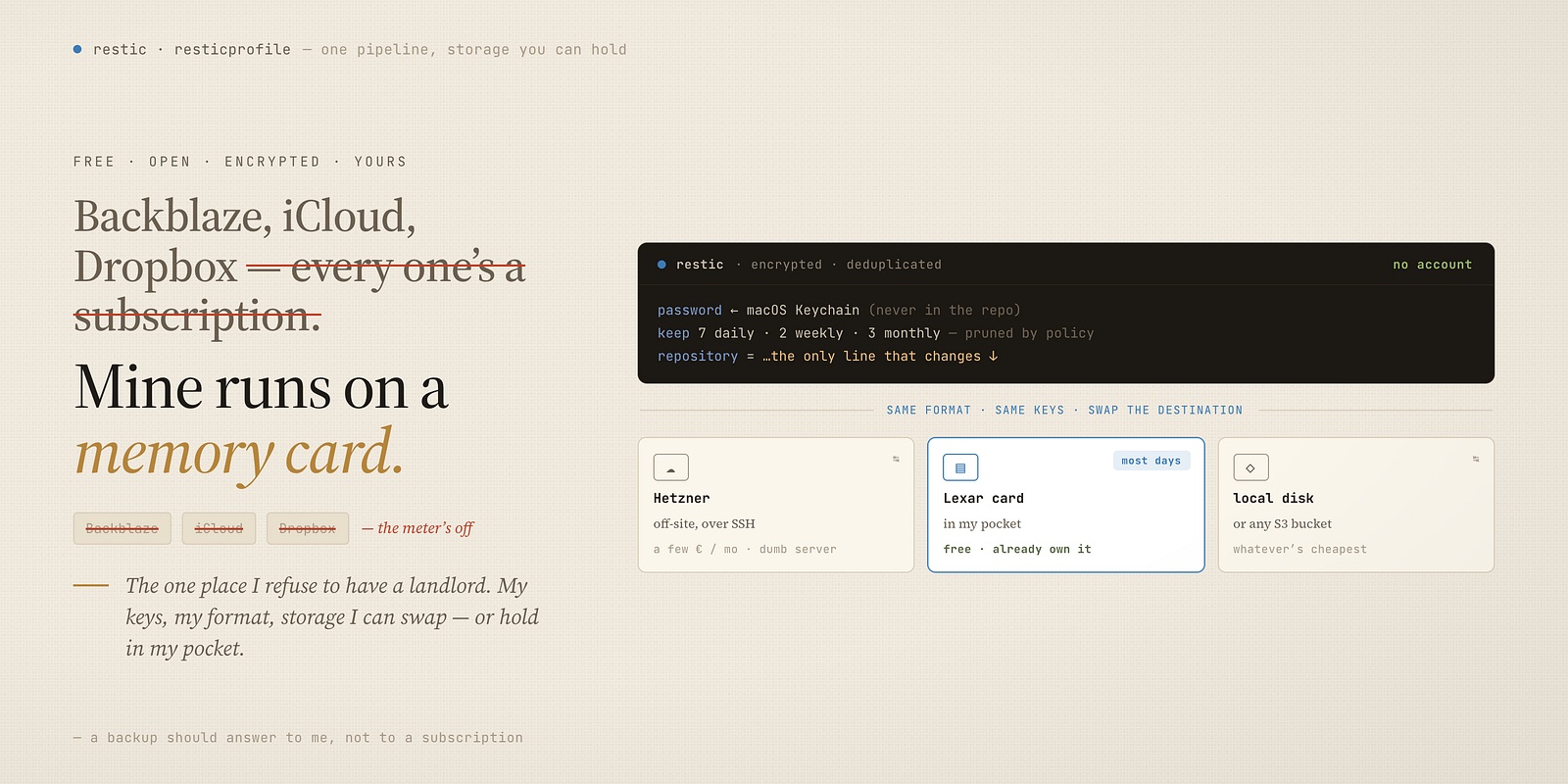
password-command = 'security find-generic-password -a restic -s restic-password -w'

[base.forget]
keep-daily   = 7
keep-weekly  = 2
keep-monthly = 3
prune        = true

[workspace]
inherit    = "base"
repository = "…/workspace"

[workspace.backup]
source  = ["~/workspace"]
exclude = ["*/node_modules/*", "*/.venv/*", "*/.cache/*", "*/.DS_Store"]
Two things I care about are in there. The repo is encrypted, and the password isn’t in the config or the repo — it lives in the macOS Keychain and is read at runtime by security. And retention is declared, not remembered: keep a week of dailies, a couple of weeklies, a few monthlies, prune the rest. I never hand-delete an old snapshot; the policy does it.
Day to day it’s a handful of Make verbs:
make restic_backup     # back up every profile, then forget/prune by policy
make restic_snapshots  # list what's in each repo
make restic_browse     # the visual restore above
restic, resticprofile, and restic-browser are all free, open-source, and installed by Nix — three lines in a package list, no account anywhere.
Scheduled, then forgotten
A backup you have to remember to run isn’t a backup — it’s a chore you’ll eventually skip. So I don’t run it; the machine does. resticprofile registers the schedule with the operating system’s own scheduler from one line of config:
[base.backup]
schedule            = "12:00"
schedule-permission = "user_logged_on"
make restic_schedule # register that schedule with the OS
On my Mac that becomes a launchd agent; on Linux the same config becomes a systemd timer or a plain cron entry — same one-liner, whichever box it’s on. Noon, every day, while I’m logged in. I don’t think about it, I don’t tick a box, I don’t get a nagging reminder. It just happens, and if I’m curious I run make restic_snapshots and watch the history grow.
The storage is just… storage
This is where the “no subscription” part gets literal. restic doesn’t care where the repo lives — a local disk, a card, an SSH target, object storage — it writes the same encrypted, deduplicated format to all of them. The destination is one line: repository = ….
So I get to treat storage as a commodity I swap, not a vendor I marry. My off-site copy goes to a Hetzner box — and I want to be honest about that: it costs a few euros a month. But it’s a dumb server I point restic at over SSH, not a backup service with my data locked inside its app. If I stop paying Hetzner tomorrow, restic and my keys still open every other copy; nothing about my backups is trapped in someone’s product.
And when I don’t need off-site — most ordinary days — restic writes to a Lexar 2000x card I already own. Fast, in my pocket, and genuinely free. Same command, same encryption, same retention; I change the one repository line and everything else is identical. That’s the freedom the subscription apps can’t offer: the pipeline is mine, and the storage under it is interchangeable and can cost exactly nothing.
It’s all in my dotfiles
The last piece is that none of this is hand-set on the machine — it’s chezmoi-managed, like the rest of my system. The profiles.toml is a template: the repo location and my workspace paths are filled in per machine, pulled from 1Password so no secret is ever in the repo. A one-time script seeds the restic password from 1Password into the Keychain on a fresh box. And Nix installs restic, resticprofile, and restic-browser so the tools are just there.
Which means recovering the backup system is the same one command as recovering everything else. Wipe the Mac, run the apply, and the profiles are written, the password is in the Keychain, the schedule is registered — backups are configured before I’ve opened a browser. The thing that protects my machine is itself reproducible from my dotfiles. It’s the same repo behind the one-command Mac rebuild; backups are just another layer that comes back on its own.
No monthly bill, no app that owns the door, no history I can lose by canceling. Free tools, my keys, and storage I can hold in my hand. That’s the whole point: a backup should answer to me, not to a subscription.
Thanks for reading. Follow on X: https://x.com/maxclaxOS
Dotfiles: https://github.com/maxclax/dotfiles
Related: